Tracking and automatically downloading
information from the Internet
Informachine allows you to use
your own judgement to choose - and keep adding to or subtracting
from - a collection of sources (sections of websites) you
want Informachine to regularly visit in order to alert you
to fresh content. (Remember that this collection can be
as large or small as you want it to be) Informachine then
downloads this fresh content and stores it so that you can
access it, share it, organise it and use it any time you
want using the tools Informachine provides. You can also
organise your chosen sources using categories that you yourself
can create. When Informachine downloads content, it will
alert you to the updates in each category.
| How it works |
|
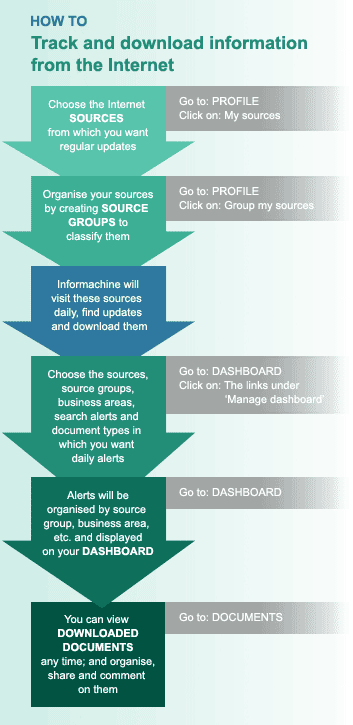
| 1. |
Using
the 'admin' module of the software, your organisation
selects a list of web 'sources' (a source could, for example, be the news section
of a corporate site) which its members would want
regularly tracked. The sources are classified
into 'business areas' such as pharmaceuticals,
banking, information technology and so on. |
| 2. |
In
your 'profile', you and each other individual
users then select web sources relevant to him/her from this collection.
You can put in a request to your organisation
for new sources. |
| 3. |
Informachine visits these web sources daily to find fresh information/documents for your
use. |
| 4. |
You
can organise or classify your chosen sources by creating your own
'source groups' to tag the sources (source groups
could be categories such as 'competitors,' 'prospective
customers,' and 'customers') |
| 5. |
Your 'dashboard' will provide you with a daily
summary of all updates from
your chosen sources, organised by source, source
group, business area and other classifications.
You can manage your dashboard by specifying what
types of information you want daily updates on. |
| 6. |
You can sort through and view all the downloaded web information anytime you want from the 'Documents' section. The user can also view the information
in its original form on the website from which
it was taken. |
| 7. |
You can also search through this information by
using Informachine's advanced search options. |
| |
|
|
 |
|


 | features | white paper